
 david
d4b8f1840e
massive update
david
d4b8f1840e
massive update
|
7 yıl önce | |
|---|---|---|
| bookworm | 7 yıl önce | |
| docs | 7 yıl önce | |
| front | 7 yıl önce | |
| screenshots | 10 yıl önce | |
| services | 7 yıl önce | |
| .gitignore | 7 yıl önce | |
| README.md | 7 yıl önce | |
| nginx_file | 8 yıl önce | |
| requirements.txt | 8 yıl önce | |
| setup.py | 7 yıl önce |
README.md
Requirements
- S3 (minio can be used for a local instance).
- Redis
- sqlite
- Python3.6
Batch process
To remove the initial roundtrip when looking for books, I keep a cache in postgres.
To populate this cache, I triggered each of the bot's LIST command, at #ebooks
I executed:
@pondering42
@dv8
@shytot
@dragnbreaker
@Xon-new
Then fetched all of the files, unarchived, concatenated them together and
deduped them.
On the resulting file I ran parse.py which inserts it into the database.
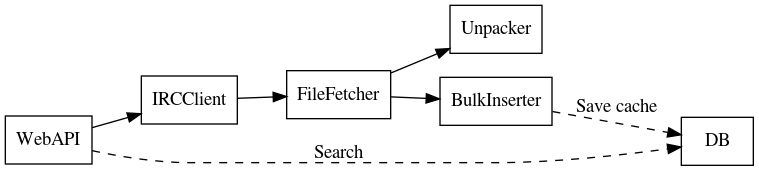
Services
Diagram
Installation
sudo cp services/bookworm@.service /etc/systemd/system/
sudo systemctl daemon-reload
sudo systemctl start bookworm@ircclient.service
sudo systemctl start bookworm@file_fetcher.service
sudo systemctl start bookworm@unpacker.service
sudo systemctl start bookworm@web.service
IRC Client
In charge of processing received commands and sending them via IRC.
Will forward details from DCC to the file fetcher via redis.
File fetcher
In charge of fetching files specified via DCC.
Will store the file in S3 and notify file details to the unpacker.
Unpacker
In charge of taking a file (as provided from IRC), unpacking it and, if necessary, converting it to mobi.
Web
API
- Lists jobs in progress (
/books/status) - Serves available books (Anything in the S3 bucket)
- Exposes a search endpont
/book/search?terms=... - Fetches books via
/book/fetch/
Web interface
--
Basic (Kindle) Web interface
The kindle has a very basic webbrowser (I believe it renders up to HTML4, CSS2.1), which can be used to download (available) books directly.
At the moment I re-route at nginx based on user agent
To test, you can use dillo which has a set of features similar to the kindle's web browser.
if ($http_user_agent ~* "armv7l") {
    rewrite ^/(.*)$ /books/kindle;
}
CLI
To be re-implemented